
The number one fear I hear from SME decision-makers about AI integration: "we have a system that works, I don't want to break everything to experiment."
Fair enough. That fear is the right one to have.
Most failed AI integration projects in SMEs aren't technical failures. They're adoption failures. The model worked, the demo was clean, the LinkedIn post got 200 likes. Six months later, the tool is dead and nobody uses it. The team went back to their spreadsheet.
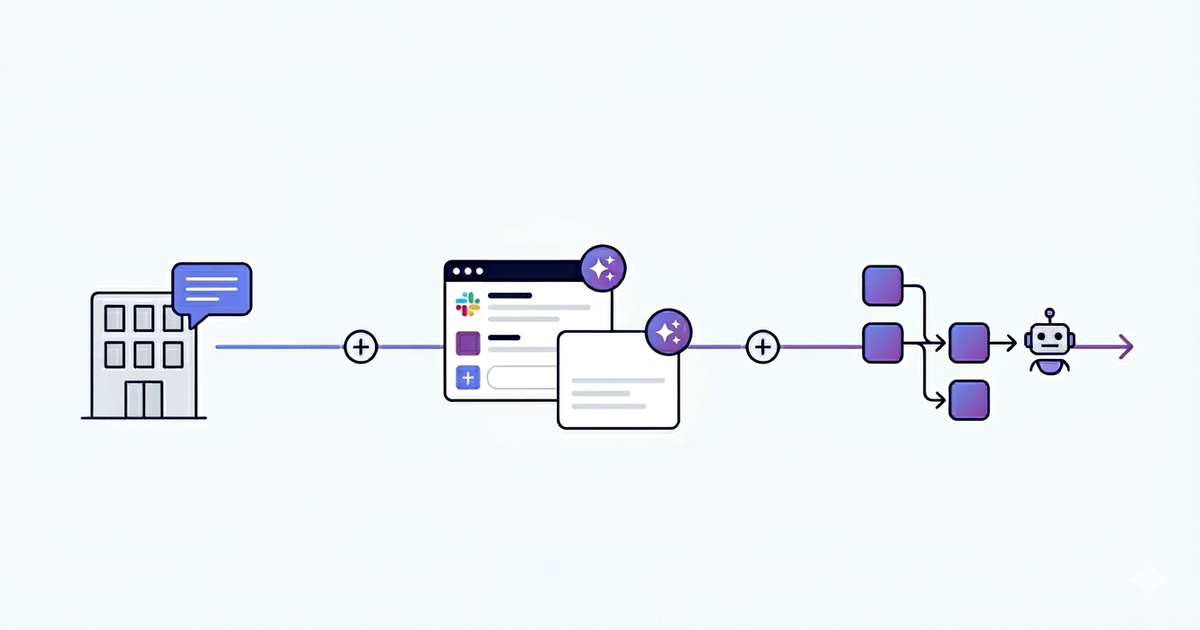
The good news: you can integrate AI in your business without breaking what already runs. It's not magic, it's sequencing. Three levels, from least risky to most engaging. You start where the impact is invisible to the operational core, and you only move up if the previous level proved itself.
Here's how it actually works.
Why "big bang" AI integration always fails in SMEs
You've probably already heard the pitch from a consulting firm: "the transversal AI project that transforms every department at once." Eight workstreams, a steering committee, an 80-slide roadmap.
It never works. Not because AI doesn't work. Because organizations don't absorb shocks like that.
Here's the pattern I've seen play out, every time. A tool gets imposed top-down. The team wasn't consulted. They already have habits, shortcuts, a workflow that works (badly, but it works). The new tool arrives, it doesn't fit their reality, it requires extra clicks, the AI hallucinates twice on day one. Two weeks later, everyone has quietly gone back to the old way. The license keeps getting paid.
AI doesn't fail because the model is bad. It fails because nobody asked the people who'd actually use it.
The real cost of the big bang isn't the tool's price tag. It's the technical debt of half-finished integrations, the loss of internal trust ("we already tried AI, it didn't work"), and the months it then takes to re-engage teams on a new attempt.
The progressive approach removes all of that. You start small, you measure, you keep what works, you scale only on the wins.
Level 1: Peripheral (zero impact on your stack)
The first level is what I call peripheral AI. It runs next to your existing tools, never inside them. Zero connection to your CRM, your ERP, your operational databases.
Typical use cases: an internal RAG system on your documentation, an HR or IT chatbot that answers recurring employee questions, a knowledge base assistant for onboarding new hires.
Why start here: no integration with critical tools means no risk of breaking anything. Deployment in two to three weeks. If the project fails, you switch off a service, you delete an account, and nothing in your operations is affected. Risk close to zero.
Concrete examples of tools at this level: Notion AI for searching internal docs, ChatGPT Team or Claude Projects for collaborative use cases, NotebookLM for analyzing a specific document corpus. Sometimes it's even simpler: a Slack channel where your team can paste questions to a custom GPT.
The limitation is real, though. Peripheral AI is useful but contained. It doesn't touch your operational core. It won't generate measurable revenue gain. Its value is to start, to demystify, to let the team see AI in action without it being a threat to their day-to-day. It's the gateway.
If you can't even pull off Level 1, the question isn't AI. It's organizational maturity. Don't move up.
Level 2: Assistance inside existing tools
This is where things get interesting. Instead of asking the team to use a new tool, you add an AI layer inside the tools they already use.
AI inside Slack, not next to Slack. AI inside the CRM, not in a separate window. AI in Gmail or Outlook, where the email gets written anyway.
The point is simple: the team keeps their habits. The mental cost of adoption drops to almost zero. They don't change tool, they get an assistant inside the tool. That's the difference between an AI nobody uses and an AI that gets used 50 times a day.
Real-world examples at this level: thread summaries in Slack ("catch me up on what happened in #project-x this week"), automatic response generation in your CRM based on the contact's history, email drafts in Gmail or Outlook that you reread and adjust before sending.
One non-negotiable rule at this level: the human fallback is mandatory. AI proposes, the human validates. Always. No outbound email gets sent automatically. No CRM record gets modified without a human in the loop. The day you remove the validation step is the day a hallucination ends up in front of a client.
This rule isn't pessimism. It's experience. LLMs hallucinate. Less than they did two years ago, but still enough to embarrass you in front of a major account if you let them autopilot. Validation isn't a brake on productivity. It's the guardrail that lets you actually deploy AI in production without praying every morning.
Level 3: Process automation
Level 3 is where AI stops being an assistant and starts replacing a chunk of repetitive work. An n8n or Make workflow, plugged into an LLM, that processes a complete process from end to end.
This is the level that generates real measurable ROI. It's also the level where you can hurt yourself if you skip the previous two.
The criteria for going there: the process must be repetitive (it gets done dozens of times a week), measurable (you can count the time saved), and it must run on structured data (not on a vague slack conversation).
I've worked at this level since long before "AI" became the buzzword. At Google via Teleperformance, I automated reporting pipelines that took 10 hours per week to produce manually. They weren't even using LLMs back then, just smart automation. The principle is the same: identify the repetition, structure the data, plug in the right tool.
Today the same logic applies, with an LLM in the loop to handle the unstructured parts (a free-text email, a PDF, a customer comment). The combination of n8n and an LLM API covers 80% of automation needs in an SME.
If you're hesitating between automation tools, I wrote a comparison of n8n vs Zapier vs Make for 2026. The short version: n8n if you want flexibility and self-hosting, Make if you want a clean visual interface, Zapier if you want maximum integrations out of the box. If you want to see how I actually run an automation engagement end to end, it's on my process automation page.
What changes at Level 3: governance becomes mandatory. Every action the workflow takes must be logged. Every error must escalate to a human. You need an audit trail. Not because the tool will fail, but because when it does, you need to know what happened, when, and on what data. Without that, you've just installed a black box that generates problems faster than your team can fix them.
Progressive AI adoption: where to start (3 criteria)
Before doing anything, three filters to know where to plant the first level.
Process criticality. Start with non-critical. Not pricing, not legal, not anything that touches client billing. Choose a process where an error has a low cost: an internal documentation search, a meeting summary, an email draft. The day AI hallucinates on a non-critical process, you smile, you fix it, you move on. The day it hallucinates on a quote sent to a major client, you have a real problem.
Data maturity. No clean data, no useful AI. It's that simple. If your CRM is half-empty, if your knowledge base is fragmented across 12 tools, if your processes aren't documented, AI will amplify the chaos rather than reduce it. Sometimes the answer to "where do we start with AI" is "we start with a data audit." I wrote about this in data audit: where to start. Doing the data audit before the AI project saves you six months and a lot of money.
Internal sponsor. Without a business owner who decides, the project dies in POC. You need someone, on the operational side, who owns the topic, who has decision-making power, and who personally benefits from the project succeeding. Without that person, even a perfect technical project will lose to organizational inertia.
If even one of these three criteria is missing, fix it before launching anything.
The 4 mistakes that break what works
Beyond the strategic question of "where to start", four operational mistakes that I see again and again and that turn a promising project into a disaster.
1. No human fallback when AI hallucinates. AI sends an email on behalf of nobody. AI updates a CRM record without anyone validating. The first time it goes wrong (and it will), you have nobody to point to internally. The validation layer isn't a luxury, it's the difference between a tool that runs in production and a tool that runs in catastrophe mode. Solution: keep a human in the loop on every output that engages the company, until you've measured the actual error rate over several months. Validation now, autonomy later, never the reverse.
2. Sensitive data sent to an external LLM without audit. Your client data, your internal contracts, your trade secrets. Sent to an OpenAI or Anthropic endpoint without anyone checking the data residency, the retention policy, the GDPR compliance. The day a regulator asks you where the data went, "we used ChatGPT" isn't an answer. Solution: a clear usage policy, a short list of validated tools (Claude Enterprise, Azure OpenAI, local deployment for the truly sensitive stuff), and a 30-minute team training on what can and cannot leave the building.
3. No measurement KPI. Without measurement, no proof of gain. Without proof, the project gets cut at the first budget review. Before launching, define exactly what you're measuring: hours saved, error rate reduced, response time. If you can't measure it, you can't defend it. Solution: pick one or two measurable KPIs before kickoff (hours saved per week, first-response resolution rate, internal NPS on the tool) and report them every two weeks. No dashboard, no project.
4. No governance, the tool becomes shadow IT. Everyone installs their own version of the assistant. Half the team is on ChatGPT Plus paid out of pocket, the other half on Claude, three people on Copilot. No coherence, no security, nobody knows where the data is going. The tool doesn't fail, the organization fails. Solution: one named AI referent inside the company, a short list of approved tools, and a lightweight process to validate any new one. Not a committee, just a single point of accountability.
These four mistakes are predictable. They're avoidable. But they require explicitly addressing each one before launching, not after.
The method in practice (typical sequencing)
In practice, here's what a clean sequencing looks like for an SME getting started.
Week 1: audit. Map out existing tools, repetitive processes, available data, internal team. Identify the low-hanging fruit at Level 1.
Weeks 2 to 5: Level 1 POC. Deploy the simplest peripheral use case. Internal RAG on documentation, knowledge base chatbot. Train two or three people. Measure the actual usage.
Weeks 5 to 6: measurement and decision. Is the tool used? Does it bring tangible value? If yes, move up. If no, stop, understand why, fix it.
Months 2 to 3: Level 2. Add AI inside an existing tool (Slack, CRM, mailbox). Mandatory human fallback. Same protocol: deploy, train, measure.
Month 4 and beyond: Level 3. Automate the first repetitive process. Set up logging, escalation, governance.
This sequencing protects what works because each step validates the next. You never engage Level 3 if Level 2 didn't deliver. You never engage Level 2 if Level 1 didn't get adopted. Each level pays for itself before the next one starts.
If you want the full method including tech stack and pricing, it's all on my AI consulting page.
FAQ
How much does AI integration cost for an SME?
Order of magnitude: Level 1 (RAG, internal chatbot) sits between €5k and €15k. Level 2 (AI inside existing tools, with human fallback) lands between €10k and €30k. Level 3 (full process automation with governance) runs from €15k to €50k depending on scope and the number of integrations. The initial audit is usually €1500 to €3000, and I often fold it into the engagement if we move forward.
How long does an AI integration project take?
Level 1 ships in 2 to 3 weeks. Level 2 takes 4 to 8 weeks because you're plugging into existing tools and need real fallback workflows. Level 3 runs 6 to 12 weeks, governance included. The audit itself takes a week. Nothing is a big bang release, every level deploys iteratively, you measure, you adjust, then you move up.
What AI tools should an SME use in 2026?
For Level 1, off-the-shelf: Notion AI, ChatGPT Team, Claude Projects, NotebookLM. For Level 2, it depends on your stack: Slack AI if you're on Slack, HubSpot AI or Pipedrive if you're on those CRMs, Copilot for Microsoft 365. For Level 3, n8n and Make for orchestration, sometimes custom Python code if the logic is complex. There's no "best tool" in absolute terms. The right tool is the one that plugs most cleanly into the process you want to automate.
Do you need to be data-mature to integrate AI?
For Level 1, no. A clean PDF and a documented FAQ are enough to deploy a useful internal RAG. For Level 2 and Level 3, yes. You need structured, accessible, reasonably clean data, otherwise the LLM amplifies the chaos instead of reducing it. If you're not sure where you stand, start with data audit: where to start before launching anything AI-related.
What to actually take away
Integrating AI in an SME isn't about replacing what works. It's about adding a progressive layer that builds on top of the existing.
The big bang fails because organizations don't absorb shocks. The progressive approach works because it respects how humans actually adopt new tools: by starting on the periphery, validating, expanding inside familiar tools, then automating only what's proven.
Three levels, four mistakes to avoid, three criteria to choose where to start. That's it. The rest is execution.
Want to ship this in your company?
If you want an AI integration scoped at Level 1 or 2, deployed on a real business process, and in production inside 3 weeks.
See the Implementation Sprint package →
If you want a 30-minute conversation to figure out where to start in your case, the contact form is right there. No slides, no pitch.
And if you want more context on what a freelance AI consultant actually does day to day, I wrote about it here.